Every Feature, Explained

12 screens packed with powerful features for collectors, investors, and players. Here's everything CardScope can do for you.

12
Screens
22,123
Cards in Database
100+
TCG Sets
6
Auto-Fill Strategies
📸

Scan Screen

The fastest way to add cards to your collection

Camera Scanning That Actually Works

Point your camera at any Pokémon card and watch it get identified in real-time. The app reads the card name, set number, and uses that to find the exact match from over 22,000 cards in the database.

We built in motion detection using your phone's accelerometer - the scanner pauses when you're moving around, so you're not wasting battery or getting false reads. You'll see a "Hold steady..." message when you need to stop moving.

When the app is confident it found the right card (matching name, number, and set size), it identifies it instantly without making you pick from a list. There's also a 3-second cooldown after each scan so you don't accidentally add the same card twice.

Bulk Scanning for Big Collections

Got a stack of cards to add? Keep scanning and they'll queue up on screen with thumbnails. Before you scan, pick a condition (Mint, Near Mint, Lightly Played, etc.) and every card you scan inherits that condition automatically.

When you're done, tap the queue to see a summary. Duplicates get grouped together with ×2, ×3 badges so you can see exactly what you scanned. One tap adds everything to your collection at once.

Manual Search & Recent Cards

Camera not cooperating? Just type the card name. Results show every version across all sets with images, so you can pick the exact one you have.

Your last 10 scanned or searched cards stick around in a carousel at the bottom, even after you close the app. Handy when you're adding multiple copies of the same card.

Scan Screen Bulk Scan Queue Scan Summary

Camera scanning with motion detection

📚

Collection Screen

Your entire collection, searchable and organized

Browse Your Way

Switch between grid view for visual browsing (2-column layout with card images) or list view when you want to see more details like set name, rarity, and current price. Swipe left on any card in list view to delete it. The app remembers which view you prefer.

Find Cards Fast

Start typing and cards filter instantly as you search. You can also filter by set (only shows sets you actually own cards from), by rarity (Common through Secret Rare), or by Pokémon type (Fire, Water, Grass, etc.).

Sort your collection by date added, price, name, or rarity. When sorting by price, you're seeing real UK market values - and they're accurate to the specific variant. A Holo Charizard shows Holo pricing, not the cheaper non-holo version.

UK Market Pricing

Prices come from Cardmarket (EUR) and TCGPlayer (USD), converted to GBP automatically. No more doing currency math in your head or wondering if the price is for your specific card variant. We get that right.

Grid & List views Swipe to delete Filter by set, rarity, type UK prices in GBP
Collection Grid Collection List Collection Filter

Grid view with filtering

📖

Virtual Binders

The feature that made us build this app

Binders That Look Like Real Binders

This is what sets CardScope apart. Other apps show you a list of cards. We show you actual 9-pocket binder pages that look exactly like the physical binders sitting on your shelf.

Create as many binders as you want - one for each master set, one for your favorites, one for trades. Choose from 4 layout options: 4-pocket for large card views, 6-pocket, the traditional 9-pocket, or 12-pocket for high-density organization.

One-Tap Auto-Fill

Here's where it gets good. Hit the auto-fill button and pick a strategy - the app instantly organizes your entire binder:

Pokédex Order puts cards in National Dex order (Bulbasaur through Pecharunt). Evolution Chains groups families together so Charmander, Charmeleon, and Charizard sit side by side. Market Value puts your most expensive cards first. Rarity sorts from Secret Rare down to Common. Type groups all your Fire types together, all your Water types together. Card Number gives you set completion order.

No other collection app has this. You'd spend hours manually organizing - we do it in one tap.

Browse Like a Physical Binder

Swipe left and right to flip pages with a page-flip animation. Tap any card to see full details and pricing. Long-press to remove a card from its slot. It feels like flipping through a real binder, but with the convenience of having every card's value at your fingertips.

Need to fill a binder quickly? Import your entire collection with one tap. Want to show off your master set? Share your binder as an image or text list.

4/6/9/12 pocket layouts 6 auto-fill strategies Import from collection Share as image
Binder Page Binder List Auto-Fill

9-pocket binder page view

🎯

Set Completion

See exactly how close you are to completing every set

Track Every Set Ever Released

Over 100 sets in the database, from Base Set (1999) all the way to the latest Scarlet & Violet releases. Each set shows the official logo and release date, so you can see the full history of the TCG at a glance.

Your completion percentage is calculated automatically - "15/102 cards - 14.7% complete" - with a color-coded progress bar so you can instantly see how close you are. Owned cards get a green checkmark, missing cards are grayed out with a "Need" badge.

Drill Into Any Set

Tap a set to see every card it contains. Cards you own are shown in full color, cards you're missing are grayed out. Want to add a card you just got? Long-press it and add directly to your collection without leaving the screen.

Toggle between showing all cards, only what you own, or only what you still need. This makes it easy to create a shopping list or see at a glance what gaps you need to fill.

Find Sets Quickly

Search by name or filter by series (Base, Neo, EX, Diamond & Pearl, Sun & Moon, Sword & Shield, Scarlet & Violet). Sort by completion percentage to put your most complete sets at the top - there's nothing like seeing that 95% complete set and knowing you're almost there.

100+ sets Progress tracking Quick-add from set view Filter owned/missing
Sets List Set Detail Set Progress

Set completion progress

📊

Portfolio Analytics

Know exactly what your collection is worth

Your Collection's Total Value

The headline number: what's your entire collection worth right now? We calculate this by multiplying each card by its quantity, factoring in condition, and using current UK market prices. It updates automatically as card values change.

Below the total, you'll see an interactive line chart showing how your collection value has changed over time. If you record what you paid for cards, the app also shows your profit or loss - your actual ROI as an investor.

Automatic Daily Snapshots

Your collection value is recorded every day automatically. This builds a 90-day history so you can see trends, spot seasonal patterns, and understand how the market is moving. You'll never lose this data - it's there whenever you want to look back.

Portfolio Breakdown

See your card counts (total, unique, graded), your most valuable card at a glance, and how your value breaks down by condition. Want to know how much your Mint cards are worth versus your LP cards? It's right there.

Total value in GBP 90-day history Profit/loss tracking Condition breakdown
Portfolio Chart Portfolio Breakdown Portfolio History

Portfolio value chart

📈

Market Intelligence

See what's hot, what's climbing, and what's rare

Top 100 Charts

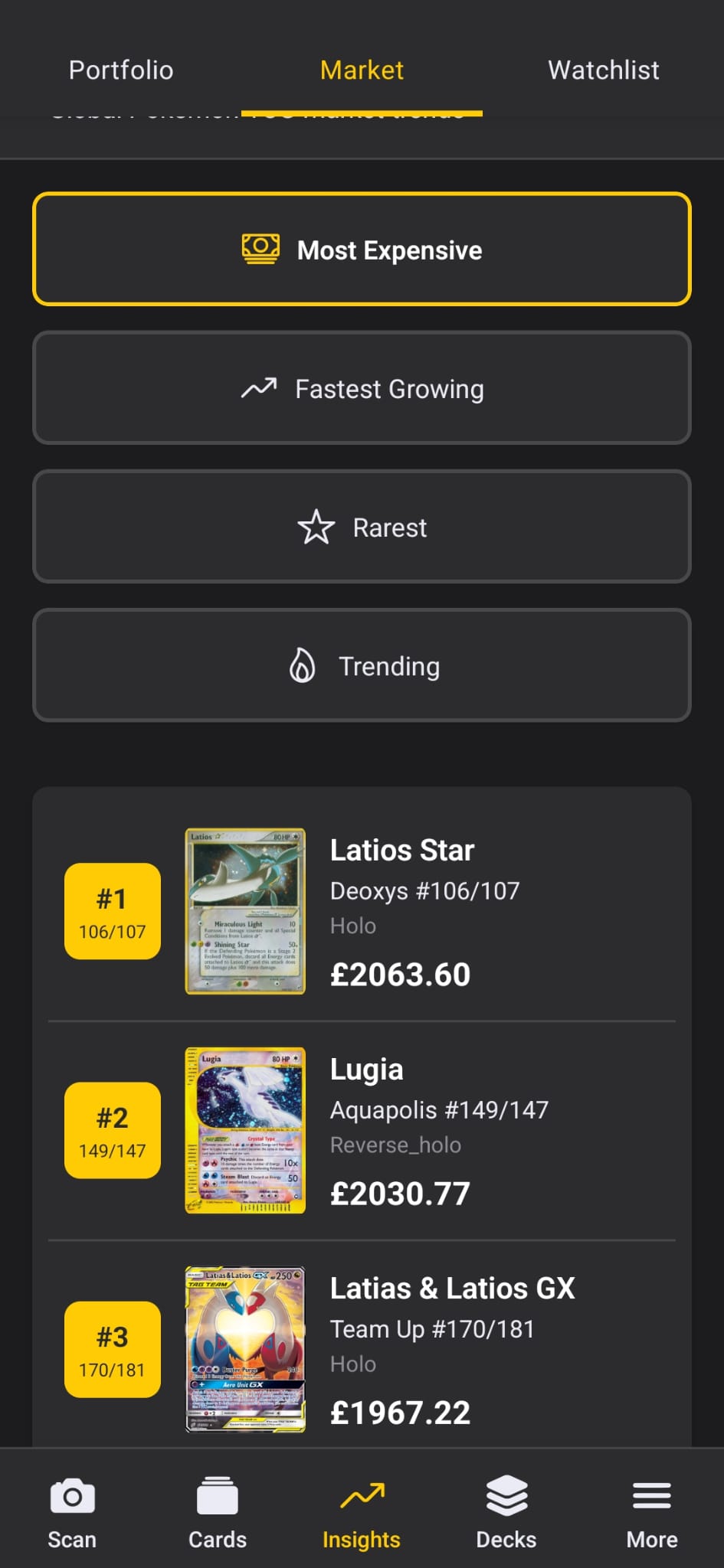
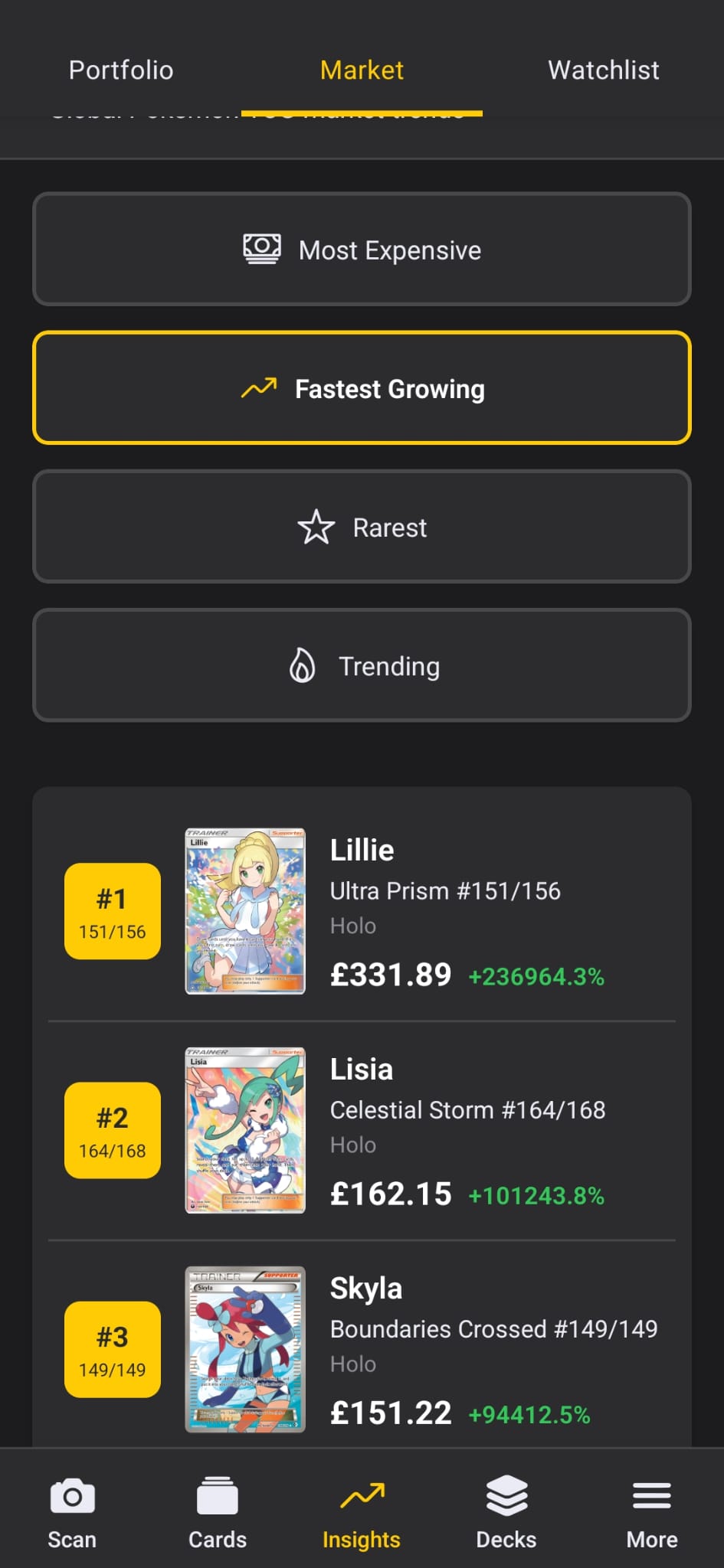
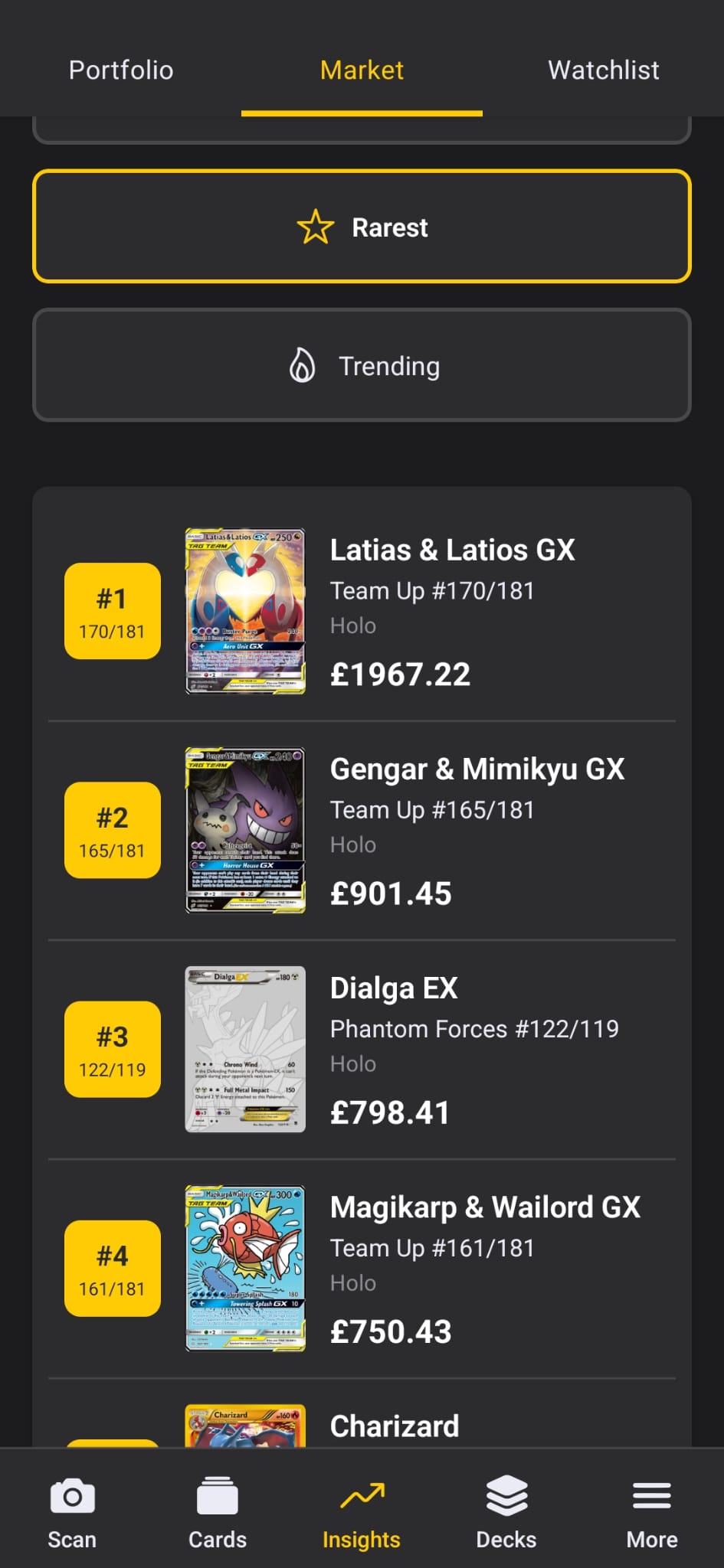
Four different ways to see what's happening in the market. Most Expensive shows the highest-value cards across all sets. Fastest Growing ranks cards by their 90-day price growth - these are your investment opportunities. Rarest combines high price with low eBay listing counts to find truly scarce cards. Trending shows 7-day acceleration - what's getting hot right now.

Track The Movement

Each card shows its current rank (#1-100) with change indicators. Green arrow means it moved up, red means it dropped, and a star marks cards appearing in the top 100 for the first time. Rankings update daily.

You'll also see the specific card variant (like "#151/156") so you know exactly which version of the card is being tracked - no confusion between different prints of the same Pokémon.

4 ranking categories Daily updates Rank change indicators Scarcity scoring
Market Rankings Market Movers Market Trending

Top 100 market rankings

👁️

Watchlist

Keep an eye on cards you want to buy

Track Cards You're Interested In

Not ready to buy yet? Add cards to your watchlist and monitor their prices. Each watched card tracks the specific variant and condition you care about - no confusion between different versions.

You can add notes to each card to remind yourself why you're watching. "Wait for dip below £50" or "Buy when I sell the other Charizard." Pull down to refresh prices on everything at once.

Price Alerts

Set a target price and get notified when a card drops to that level. Or set percentage alerts to catch big swings - useful for cards that might spike or crash. When the market moves, you'll know about it.

Track any card Add notes Target price alerts Swing alerts
Watchlist Price Alerts Add to Watchlist

Price watchlist

🃏

My Decks

Build decks and see exactly what you're missing

Build Competitive Decks

Create decks for Standard, Expanded, or Unlimited formats. Name your deck, add a description, and tag it with a strategy type (Aggressive, Control, Combo, etc.). The card breakdown shows you at a glance how many Pokémon, Trainers, and Energy you have.

Automatic Validation

The deck builder enforces the rules so you don't have to think about them. It checks that you have exactly 60 cards, no more than 4 copies of any card (except Basic Energy), and that all cards are legal in your chosen format. You'll see warnings if something's off.

See What You Own vs What You Need

This is where the deck builder connects to your collection. Cards you already own get a green checkmark. Cards you're missing get a red "Need" badge. Add up all the missing cards and you see the total cost to complete the deck - a real shopping list with real prices.

Export and Share

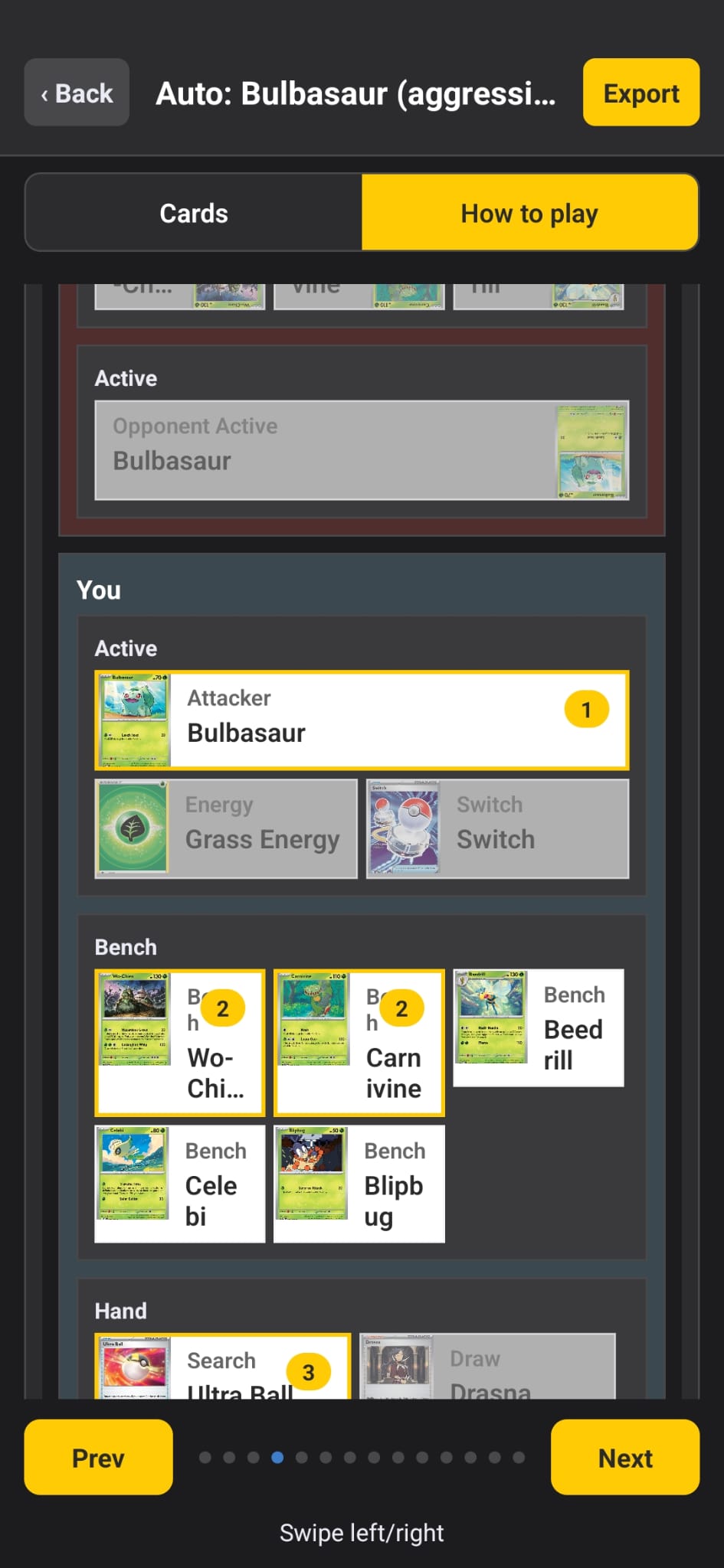
Export your deck in multiple formats: PTCGO format for importing into the online game, plain text for sharing on forums, or JSON for backup. There's also a "How to Play" tab that shows your deck's early/mid/late game strategy and a visual board setup guide - perfect for learning a new deck.

Format validation Owned/need indicators Export to PTCGO How to Play guide
Deck Builder Deck List Deck Edit

Deck with owned/need indicators

📋

Deck Templates

Start from proven tournament-winning lists

Browse Meta Decks

Don't want to build from scratch? Browse pre-built decks that have actually won tournaments. Each template is tagged with a tier ranking (S-Tier through C-Tier) so you know what's competitively viable versus what's just for fun.

Filter by format (Standard or Expanded) and by strategy type. Each template shows a preview of the key cards so you can quickly scan what's available.

See What You Already Own

Every template shows how much of it you already have: "45/60 cards (75%)". This makes it easy to pick a deck where you only need to buy a few cards to complete it, rather than starting from zero.

Clone and Customize

Found one you like? One tap clones it to your personal decks. From there you can tweak it, swap cards, and make it your own. You'll see a shopping list of exactly which cards you still need to buy.

Tournament-winning lists Tier rankings % owned shown One-tap clone
Templates Template Detail Copy Template

Meta deck templates

🤖

Auto-Deck Builder

Generate playable decks from cards you already own

One-Tap Deck Generation

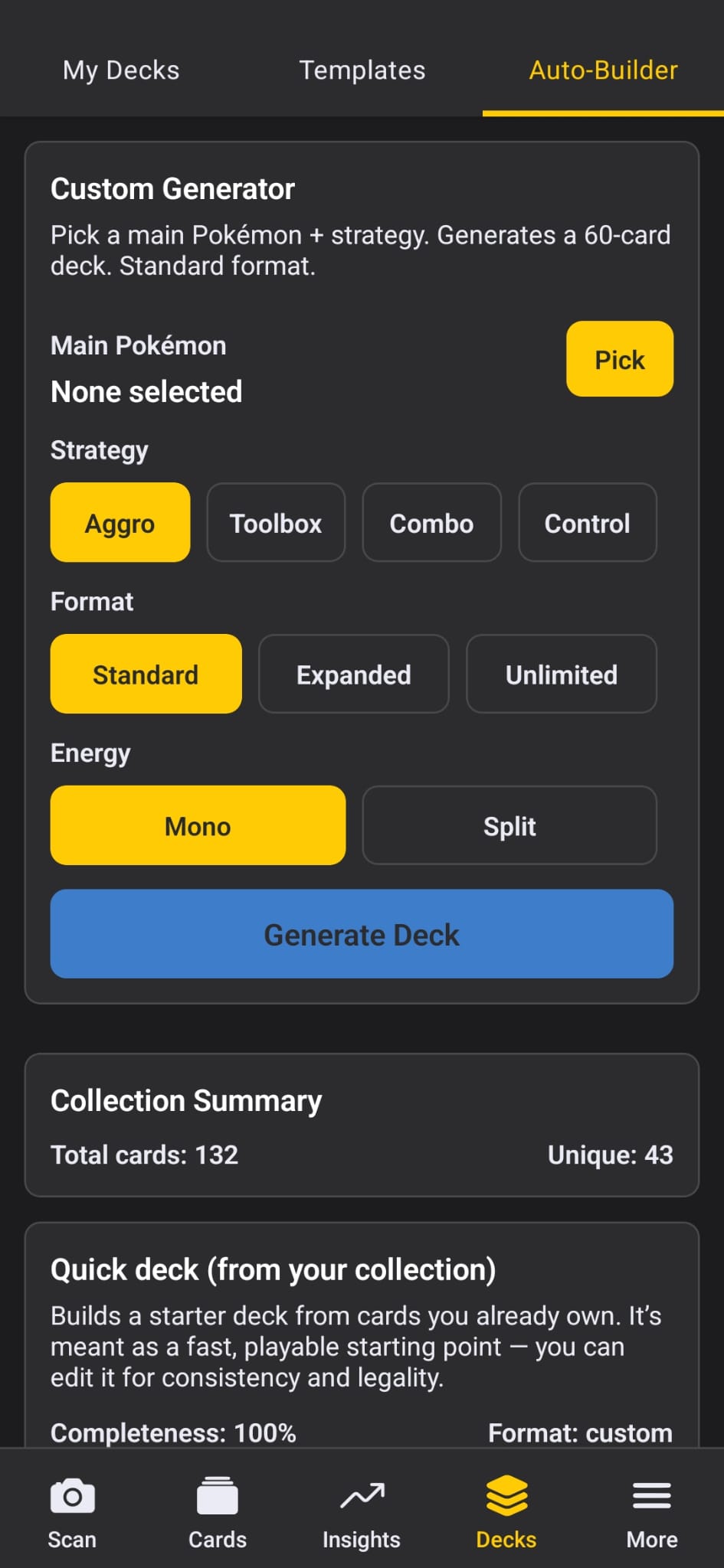
This is the feature that surprised us the most. Pick a main Pokémon to build around, choose a strategy (Aggressive, Control, Combo, Stall, or Toolbox), and hit build. The app generates a legal 60-card deck using only cards you already own. No shopping required - you can sleeve this up and play immediately.

The builder checks the official banlist before generating - it won't waste your time building something that's not tournament legal.

How It Works

The builder looks at your collection and finds cards that work together. It groups evolution lines, matches type synergies, and identifies combo pieces. Then it calculates the right energy types and quantities based on what attackers you're running.

The result isn't random - it's a coherent deck with a strategy. Pick Aggressive and you'll get fast attackers with high damage. Pick Control and you'll get disruption and denial cards.

Improvement Suggestions

After building, the app suggests specific cards that would make your deck more competitive - typically 3-5 cards that would be strong additions. It shows you the price of these upgrades so you can decide if it's worth buying them.

Build from owned cards 5 strategy modes Banlist checking Synergy detection
Auto-Builder Build Result Save Deck

Auto-generate decks from collection

🔍

Card Details

Full card info with interactive 3D display

3D Card Display

Tilt your phone and the card responds. Using the accelerometer, we created a "window into 3D space" effect where the card appears fixed while you move the phone around it. Tilt left to see the right edge, tilt forward to see the bottom. It's surprisingly satisfying and makes browsing your collection feel more tactile.

Complete Card Information

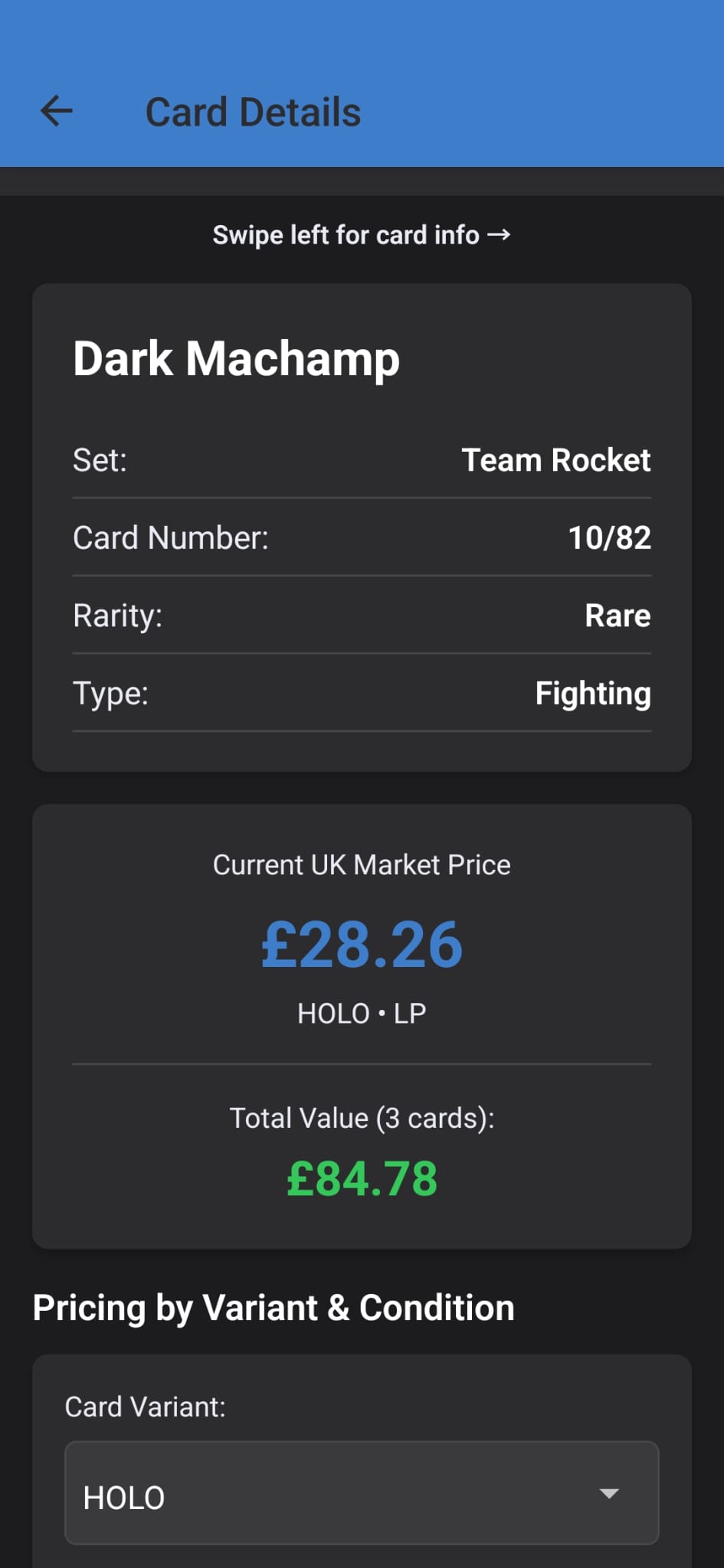
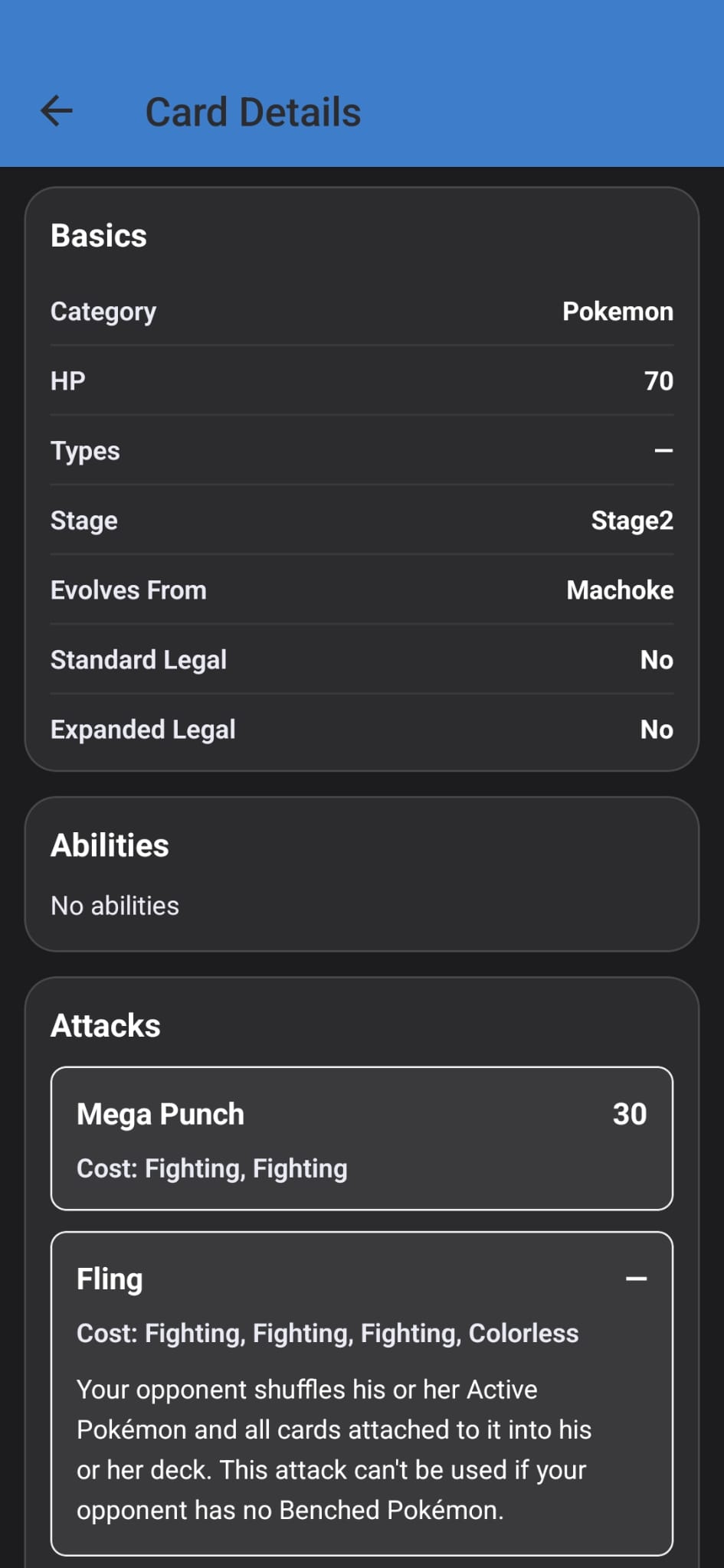
Every piece of metadata you'd want: name, set, card number, rarity, type, HP, attacks, weaknesses, resistances, and evolution information. High-resolution artwork pulled from TCGdex CDN so you can zoom in on the details.

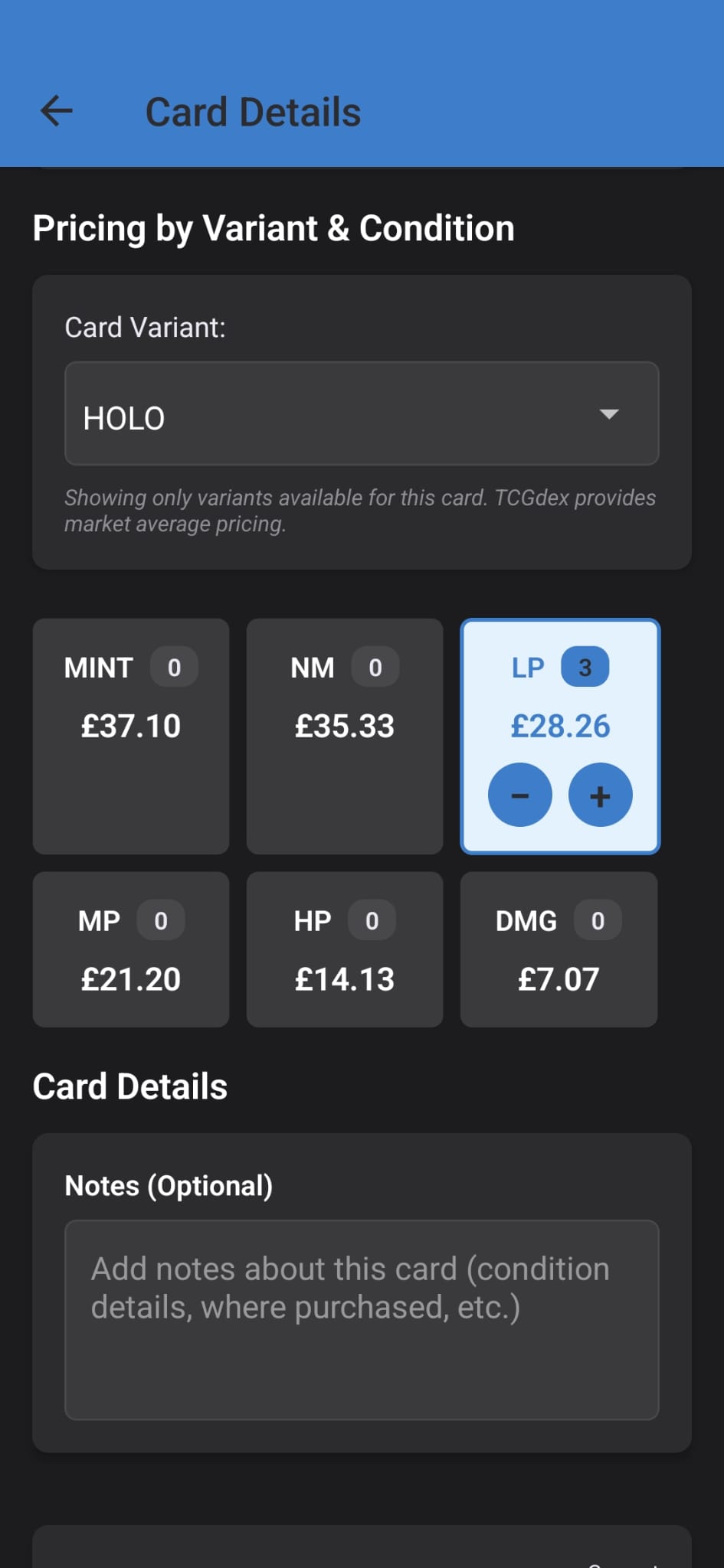
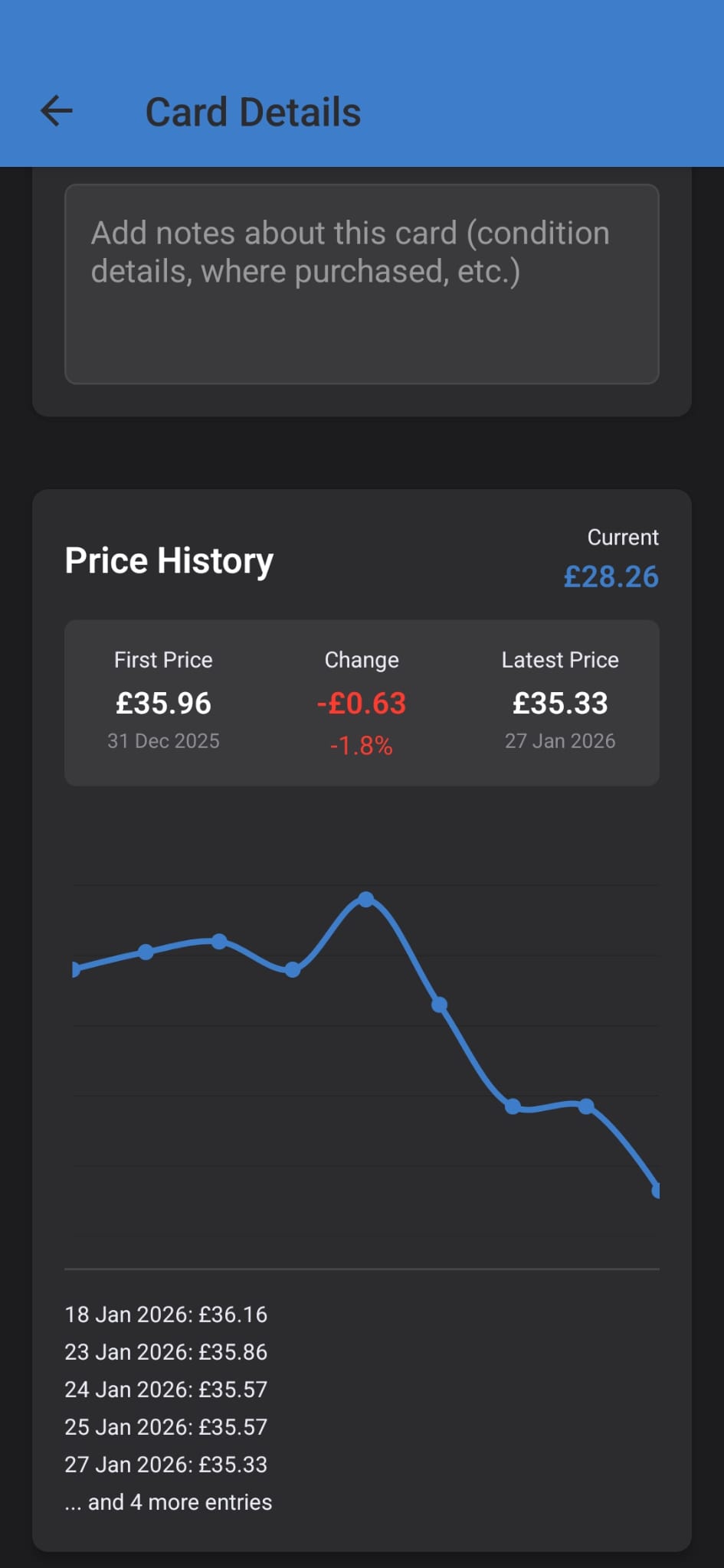
Pricing is shown per variant (Normal, Holo, Reverse Holo, 1st Edition, Unlimited) with 90-day price history charts. You can see exactly how prices have trended and where they're sourced from - Cardmarket EUR, TCGPlayer USD, and eBay UK all contribute to the Fair Price calculation.

Adding to Your Collection

When you add a card, you specify everything: variant type, condition (MINT through DMG), grading company and grade if applicable, and purchase information - what you paid, when, and where. This data feeds into your portfolio analytics so you can track your investments over time.

3D tilt effect Per-variant pricing 90-day charts Grading support
Card Details Card Pricing Price History

Card details with 3D tilt effect

⚙️

Settings

Customize your experience

Theme & Appearance

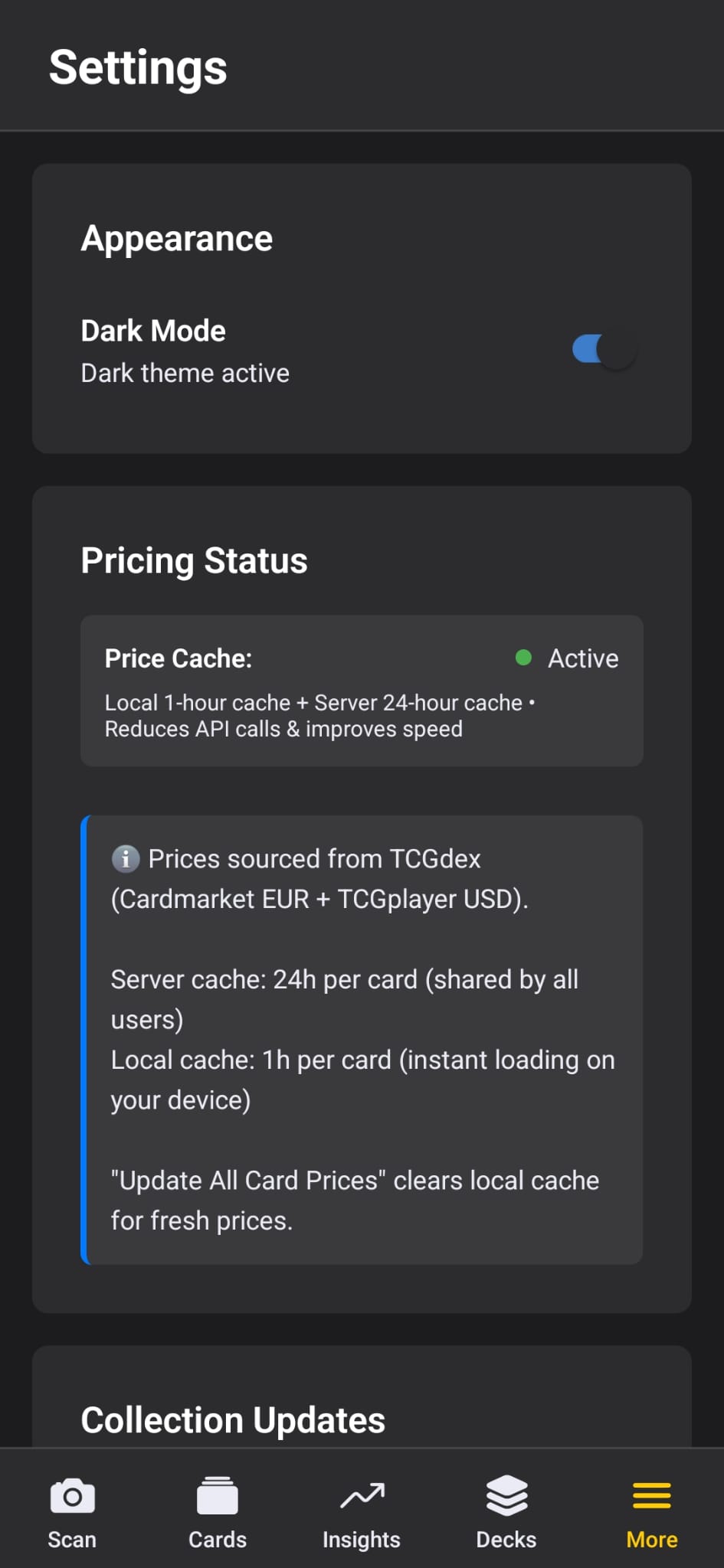
Dark mode is the default and looks better with card artwork, but light mode is there if you prefer it. Your choice persists across sessions - the app remembers how you like it.

Price Cache Management

Prices use a two-tier caching system. Your device keeps a 1-hour local cache for instant loading, while the server maintains a 24-hour cache shared by all users. This means snappy performance without hammering the pricing APIs.

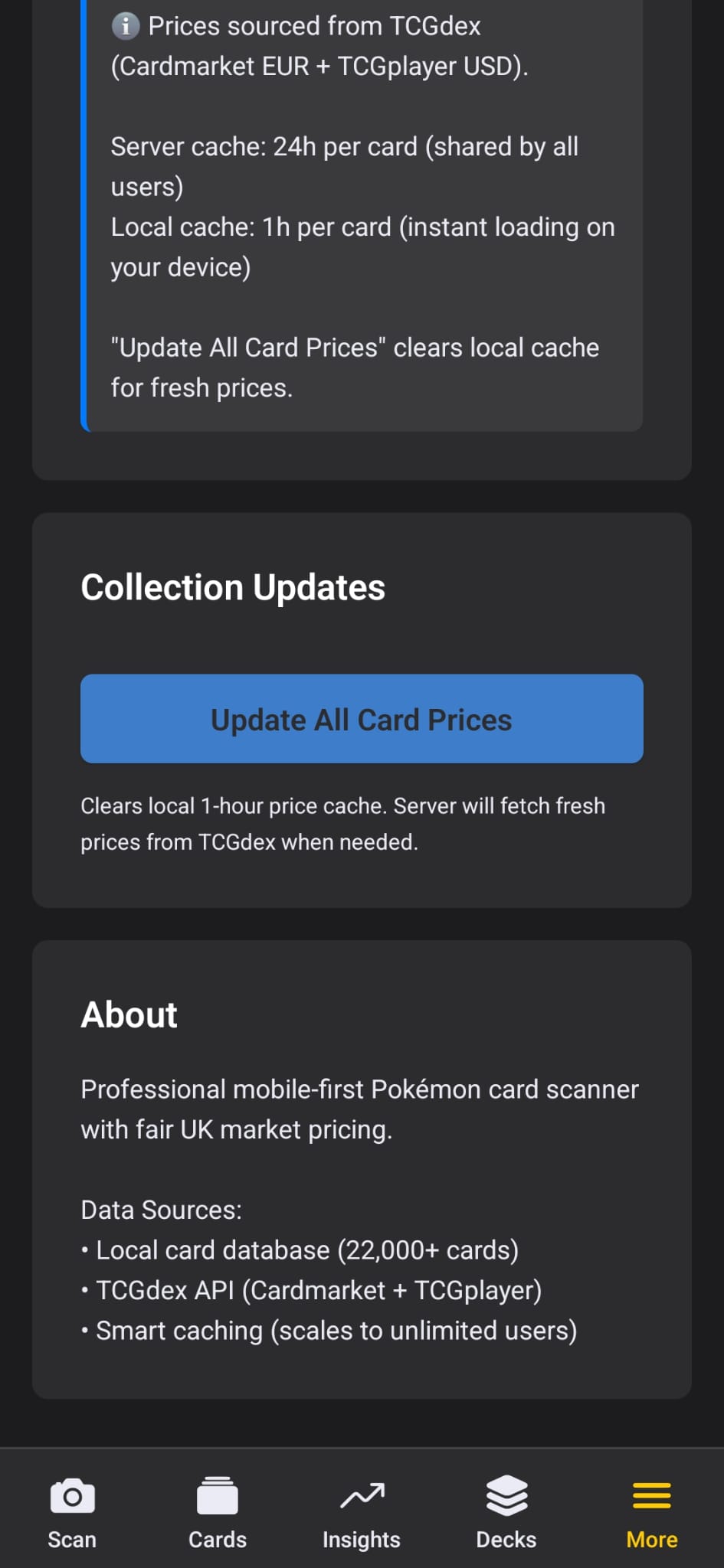
If you need fresh prices (maybe you're about to make a trade), there's a one-tap button to clear your local cache and pull the latest data from TCGdex. A status indicator shows when prices were last updated so you always know how current they are.

Under the Hood

The app includes a database of 22,000+ cards for fast recognition and browsing. Card images and live pricing come from TCGdex, which aggregates Cardmarket and TCGplayer data. The server-side architecture means we can scale to unlimited users without hitting rate limits.

Dark/Light mode Two-tier cache 22k+ card database One-tap refresh
Settings Cache Status About

App settings and preferences

Ready to Organize Your Collection?

12 screens. Thousands of features. One app that does it all.

Start Free

Free forever (10 cards) • £4.99 to unlock everything